A couple of years ago we started seeing an increasing number of incoming "ghost" calls on our codecs. This only affected users who opened the SIP functionality on their devices to be compatible with SIP-based calling apps and WebRTC bridging. We cut some firmware to address this, by implementing a "blacklist" of common attributes of these calls. They got worse, and we couldn't keep up with all the new robo-dialers, so we killed G.711 support so most of these calls would be rejected. Some still make it through and can tie up the codec for a short time until they get rejected. Now, we have a new app, and there will be more SIP users and it's even more important to reject unwanted calls quickly. So here's our third try...
First some background--The calls come in over the SIP channel integrated into our codecs. For convenience the codec will respond to any calls it gets from the Internet, not just a provider. This way you don't have to worry about registering your SIP device and using a certain provider to dial in. You can make a direct call to your codec at it's IP address without any proxies or other nonsense. This provides for more reliable connections.
The new approach is to integrate a "whitelist" of user agents from the calling apps we know folks use. If the incoming UA doesn't match our list, the codec doesn't respond. We've populated the whitelist with everything we know about, and users can add or subtract entries. It's turned on by default but can be disabled by the user. This is available in firmware release 4.0p17 and above.
If you're experiencing incoming ghost SIP connections, upgrade your codec firmware and you should be good!
Friday, April 20, 2018
FieldTap is now the best codec app
NAB 2018 is over and Comrex introduced four new products! One of them is a new codec app. We've been pointing folks to Linphone for years, and it's great and free, but we often hear it's too complex for non-techies to set up and use. Enter FieldTap!
Under the hood, FieldTap is Linphone. Go open source software! But it's been optimized for using with codecs the following ways:
* "broadcasty" interface with mic level meter
* stand-alone contact list (no need to share with phone's main contacts)
* No SIP registration required (and no annoying notices when not registered)
* accepts IP addresses, SIP URIs, and (when registered) phone numbers
*Simplified codec selection (Opus, G.722, G.711)
*Free and available on iOS and Android
*Works with Comrex ACCESS, BRIC-Link, STAC-VIP, VH2, and Earshot IFB* products
FieldTap is a breeze to use and sounds great. iOS will be up in a couple of weeks and Android coming late Spring 2018. Look for it and give it a spin.
*Bloggin about this new product soon
Under the hood, FieldTap is Linphone. Go open source software! But it's been optimized for using with codecs the following ways:
* "broadcasty" interface with mic level meter
* stand-alone contact list (no need to share with phone's main contacts)
* No SIP registration required (and no annoying notices when not registered)
* accepts IP addresses, SIP URIs, and (when registered) phone numbers
*Simplified codec selection (Opus, G.722, G.711)
*Free and available on iOS and Android
*Works with Comrex ACCESS, BRIC-Link, STAC-VIP, VH2, and Earshot IFB* products
FieldTap is a breeze to use and sounds great. iOS will be up in a couple of weeks and Android coming late Spring 2018. Look for it and give it a spin.
*Bloggin about this new product soon
Thursday, October 27, 2016
Hate Adobe Flash? We've got options
Comrex products like ACCESS, BRIC-Link and STAC-VIP each serve a rich webpage that functions as their main user interface. For a variety of reasons (that were perfectly sound at the time) these pages were designed with the Adobe Flash tool.
But Flash has gotten a (not entirely undeserved) reputation in recent years. Its constant need for updating the client to patch security exploits makes IT people nervous, and the browsers that support it are in the process of trying to actively minimize its use by throwing up warnings, and requiring it be manually enabled.
Flash is so embedded in the web that it's not going anywhere soon, but it's time to consider alternatives for driving Comrex products. For ACCESS and BRIC-Link, we're providing a free Windows and Mac app called Codec Commander.
Codec Commander is based on the premium Fleet Commander app we introduced last year. It has all the same features, and is compatible with the new 4.0 firmware we've been shipping with our codec hardware for the past year. So it will provide all the same utility as the web interface, including the really useful Crosslock stats and delay setting bar.
Codec Commander is available in beta form by contacting our support team at techies@comrex.com, and should be available universally on our web site within weeks.
Update 12/7/16: CC and FC are now available on the Comrex Website!
Thursday, October 20, 2016
Broken Wifi Adapters got you down?
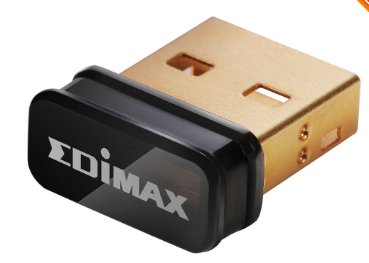
With our ACCESS portable and LiveShot portable codecs, we ship a a high gain Wifi adapter, the Edimax EW7811-UAC. It has an in-built antenna, conforms to all the latest high throughput standards, and is dual band. It also sticks up a bit, which can result in a broken USB port (as shown) if the adapter is whacked or if the codec is dropped.
If your Wifi application doesn't require a lot of range or all these fancy standards, (e.g. you're using a wireless Hotspot fairly close to your codec) you might consider changing to something that isn't "out there" asking to be broken.
We've tested the Edimax EW7811-Un (pictured) and it works well, but on a single band and with the lower range you'd expect given it's form factor. But if that's all you need, it's available from lots of online retailers.
If your Wifi application doesn't require a lot of range or all these fancy standards, (e.g. you're using a wireless Hotspot fairly close to your codec) you might consider changing to something that isn't "out there" asking to be broken.
We've tested the Edimax EW7811-Un (pictured) and it works well, but on a single band and with the lower range you'd expect given it's form factor. But if that's all you need, it's available from lots of online retailers.
Wednesday, October 19, 2016
OnSIP/Comrex WebRTC issues by Codec Answer Guy
Q: I use OnSIP to bridge web calls to my codecs via this technote.
It doesn't work anymore! What happened?
A; OnSIP (our favorite VoIP company) made a change to the way they
bridge WebRTC to SIP calls. They now offer a new app at app.onsip.com to allow for
this function.
Q: So I can just use the new app?
A: Not yet. The app functions fine, but it changes a
technical detail of how the call gets treated on the VoIP end of things. ACCESS
and BRIC-Link can not answer these calls. STAC-VIP can answer them, but only using the narrowband G.711 protocol, so it sounds like a phone call.
Q: Give me all the details, I can handle it.
A: The old GetOnsip app offered VoIP calls with an "early
offer" SDP protocol, and our hardware liked that fine. app.onsip.com uses
a "late offer" scheme that we don't support.
Q: What's the fix?
A: The answer can only come in a firmware upgrade from Comrex.
We’re working on it and hope to have something by the end of 2016. Until then, you
can use SIP softphone apps, or one of the premium Hosted WebRTC Gateway services
like ipDTL and Callme.fm.
Look here for updates as they develop!
Update 10/26/16: That was fast! Test code available. Contact Comrex support at techies@comrex.com
Update 12/9/16 Firmware 4.0p11 released today has this fix.
Update 10/26/16: That was fast! Test code available. Contact Comrex support at techies@comrex.com
Update 12/9/16 Firmware 4.0p11 released today has this fix.
Monday, August 22, 2016
When the backup becomes the primary
Also of note was the ability of WW1's roving reporters to use local 4G LTE on ACCESS portable to be totally mobile.
Here in New England, we're excited for a different backup to take on the primary role this fall. Here's hoping he's just as reliable!
Wednesday, July 13, 2016
Copper is out, VoIP is in

If you're looking for every relevant fact ever known about Voice Over IP in an easily digestible format, check out our new primer available here. Pass it around, we worked hard on it, and hope you enjoy it.
Tuesday, May 17, 2016
Nifty BRIC-Link Accessory from the UK
Much like the US has a "special relationship" politically with the UK, we at Comrex work closely with our UK partners, Vortex, on special projects. Their latest one is the VX-4901 panel. It turns a BRIC-Link II codec into a full-featured intercom system, allowing the easy connection of ten sites and connection of a speaker an microphone within the panel. Have a look and contact Vortex directly if it meets a need.
Wednesday, April 27, 2016
NAB 2016 is a wrap
![]() |
| Putting the finishing touches on the NAB stand 2016 |
It was hard to make the decision to show the next gen ACCESS Portable at the show, especially since it won't be available for some time. But in the end we decided it was probably best to tip our hand. Our customers deserve it. And judging by the reaction and valuable feedback, it was a good call.
Friday, April 8, 2016
Thoughts on Security
Several stations using Barix codecs for STL have been diverted to receive an adult-oriented stream, then locked to that stream this week. Many theories are floating about the sophistication of the attack, but I'm a fan of Occam's Razor on this. I've seen enough web interfaces unprotected out there that I think this attack employed a simple lookup on an Internet-of-Things directory site, then login via default password.
For Comrex codecs, it's a good time to review security options:
Minimum: Change the default web interface password to something long and secure. Don't put the codec on an IP address with a searchable URL (this helps it not show up on google search).
Reasonably Cautious: Secure the web interface (port 80) behind a firewall with VPN capability. Use the connection password function to secure your BRIC normal connections. If not using them, disable SIP/EBU 3326, HTTP and standard RTP functionality (these are off by default).
Very Secure: Disable the web interface entirely and use only the local GUI (applies to ACCESS only). Turn off remote diagnostics via SSH (note: SSH requires a key from the factory that is never shared, therefore is already quite secure). Apply an encrypted VPN to the codecs on each end of the link, so your actual stream is encrypted.
And be careful out there!
For Comrex codecs, it's a good time to review security options:
Minimum: Change the default web interface password to something long and secure. Don't put the codec on an IP address with a searchable URL (this helps it not show up on google search).
Reasonably Cautious: Secure the web interface (port 80) behind a firewall with VPN capability. Use the connection password function to secure your BRIC normal connections. If not using them, disable SIP/EBU 3326, HTTP and standard RTP functionality (these are off by default).
Very Secure: Disable the web interface entirely and use only the local GUI (applies to ACCESS only). Turn off remote diagnostics via SSH (note: SSH requires a key from the factory that is never shared, therefore is already quite secure). Apply an encrypted VPN to the codecs on each end of the link, so your actual stream is encrypted.
And be careful out there!
Tuesday, April 5, 2016
Here comes the VH2
Debuting at NAB this month is the VH2, an audio telephone "hybrid" for VoIP. Hybrid is in quotes because it's not doing the traditional phone line cancellation (not required in the VoIP world), but functionally it acts like a traditional studio telephone interface. It's pictured with its companion VoIP phone, and like a traditional hybrid you can bounce calls between the devices, making outgoing or taking incoming calls on the handset and moving them to the hybrid with a single button push. Some other interesting stuff:
Dual Channel
Caller AGC and peak limiting
Conference or independent modes
G.711/G.722 support
remote control by web or contact closure
Dual "Hold" audio inputs
Balanced pro level XLR I/O
AES3 I/O
Integration with most IP PBXs
As deep background, we cut our teeth on VoIP with the STAC-VIP talkshow system a few years back. Having rung that out (and gained a lot of expert knowledge), it made sense to cost-and-feature reduce the idea down to a simpler two channel version without the fancy control surface.
And when we designed the BRIC-Link II codec last year, we did it in a way that would allow the hardware to support other projects. So the dual rack adapter and other accessories are the same. VH2 is a blend of several other products inside and out. Demos should be available soon.
Dual Channel
Caller AGC and peak limiting
Conference or independent modes
G.711/G.722 support
remote control by web or contact closure
Dual "Hold" audio inputs
Balanced pro level XLR I/O
AES3 I/O
Integration with most IP PBXs
As deep background, we cut our teeth on VoIP with the STAC-VIP talkshow system a few years back. Having rung that out (and gained a lot of expert knowledge), it made sense to cost-and-feature reduce the idea down to a simpler two channel version without the fancy control surface.
And when we designed the BRIC-Link II codec last year, we did it in a way that would allow the hardware to support other projects. So the dual rack adapter and other accessories are the same. VH2 is a blend of several other products inside and out. Demos should be available soon.
Here's a Secret: Comrex Connect International Modems work in the USA
I've griped plenty in the past about the wireless situation in the USA, where each carrier uses completely different LTE bands, so no universal USB modems exist. But here's a secret: The Comrex Connect modem designed for International use includes virtually every LTE band in use in the USA.
What's the catch? If you go to your favorite carrier (at least Verizon and AT&T) and try to get them to register this modem, they won't be able to help you. The model is not in their database because it hasn't gone through their crazy tedious and expensive certification process. This is why we offer Comrex Connect modems specifically for Verizon and AT&T networks that carry these certifications.
Now, I'm not saying you should take a pre-registered data SIM and use it in the International Connect modem. I would never say that. I'm just saying that technically, this seems to work in our testing. And technically, this creates a scenario where you can simply move any convenient SIM card from any carrier (except probably Sprint, who put the kibosh on such things) worldwide into the modem, and off you go.
Technically.
Edit 8/12/2016- We're getting word that in some markets, International modems no longer work with Verizon SIMs. The SIMs we keep for testing in our lab are still fine, but there may be some changes in the works.
What's the catch? If you go to your favorite carrier (at least Verizon and AT&T) and try to get them to register this modem, they won't be able to help you. The model is not in their database because it hasn't gone through their crazy tedious and expensive certification process. This is why we offer Comrex Connect modems specifically for Verizon and AT&T networks that carry these certifications.
Now, I'm not saying you should take a pre-registered data SIM and use it in the International Connect modem. I would never say that. I'm just saying that technically, this seems to work in our testing. And technically, this creates a scenario where you can simply move any convenient SIM card from any carrier (except probably Sprint, who put the kibosh on such things) worldwide into the modem, and off you go.
Technically.
Edit 8/12/2016- We're getting word that in some markets, International modems no longer work with Verizon SIMs. The SIMs we keep for testing in our lab are still fine, but there may be some changes in the works.
Verizon XLTE is terrible...except when it's awesome
If you're a LiveShot/ACCESS Verizon LTE user in the US, your wireless modems will likely have a choice between the "standard" LTE band 13 (700MHz) and the "XLTE" Band 4 (AWS-1700/2100MHz). When I say your modems will have a choice, I mean it literally, since you can't easily choose in software.
We've been conducting tests in the Boston area for an upcoming sporting event, (mid April, hint hint), and our results on Verizon have been disappointing. Conveniently, the codec firmware gives you an indication of which band your modem has chosen. And it seems that whenever offered the chance, modems along the "route" will gravitate to the higher Band 4. Our working theory is that Verizon is trying to keep it's primary Band 13 as clear as possible.
We ran some tests with our modems locked to the lower band 13, and performance was dramatically improved. So the next theory was that the XLTE band, due either to RF or backhaul limitations, was vastly inferior to the standard band.
Since our sales director works from the Atlanta market, we ran a test there as well. But the results were quite different. A single modem working the XLTE band there easily delivered HD video with low delay at around 6Mbps.
So much for theories.
So it seems to be a regional thing. If you're experiencing poor Verizon performance on Comrex Connect modems, you can lock out XLTE by going into the following location:
Network Devices->LE910-SVG->SIM (sim_number)->Show Advanced Items->Extra Modem Init
and adding the following:
AT#BND= , ,1000
Be careful because it will stay that way unless changed back.
To change it back to default, enter
AT#BND= , ,1008
(there is a space between the = and the comma and between the commas)
You only need to reboot the modem once with this setting, and you can clear the field after.
We've been conducting tests in the Boston area for an upcoming sporting event, (mid April, hint hint), and our results on Verizon have been disappointing. Conveniently, the codec firmware gives you an indication of which band your modem has chosen. And it seems that whenever offered the chance, modems along the "route" will gravitate to the higher Band 4. Our working theory is that Verizon is trying to keep it's primary Band 13 as clear as possible.
We ran some tests with our modems locked to the lower band 13, and performance was dramatically improved. So the next theory was that the XLTE band, due either to RF or backhaul limitations, was vastly inferior to the standard band.
Since our sales director works from the Atlanta market, we ran a test there as well. But the results were quite different. A single modem working the XLTE band there easily delivered HD video with low delay at around 6Mbps.
So much for theories.
So it seems to be a regional thing. If you're experiencing poor Verizon performance on Comrex Connect modems, you can lock out XLTE by going into the following location:
Network Devices->LE910-SVG->SIM (sim_number)->Show Advanced Items->Extra Modem Init
and adding the following:
AT#BND= , ,1000
Be careful because it will stay that way unless changed back.
To change it back to default, enter
AT#BND= , ,1008
(there is a space between the = and the comma and between the commas)
You only need to reboot the modem once with this setting, and you can clear the field after.
Thursday, September 24, 2015
Venting on the XLR
I love XLRs.
I hate XLRs.
They are universal, robust, and easy to repair. They have obvious gender to indicate direction. They are the only respectable way to provide a pro-grade, balanced audio I/O. They also carry digital audio.
They are also huge. In an age where portable gear is shrinking, it's crazy to dedicate a one inch diameter circular port to a mono audio feed. And requiring a pair for stereo? don't get me started.
Even in studio gear, the demand for back-panel space has grown. Besides the power socket, we need to now provide video monitor, USB, serial and contact closures. Can you imagine what a piece of gear would look like if each of the signals on these connectors took up the space of an XLR?
Why hasn't the broadcast/pro audio industry moved to something with a more reasonable size?
I hate XLRs.
They are universal, robust, and easy to repair. They have obvious gender to indicate direction. They are the only respectable way to provide a pro-grade, balanced audio I/O. They also carry digital audio.
They are also huge. In an age where portable gear is shrinking, it's crazy to dedicate a one inch diameter circular port to a mono audio feed. And requiring a pair for stereo? don't get me started.
Even in studio gear, the demand for back-panel space has grown. Besides the power socket, we need to now provide video monitor, USB, serial and contact closures. Can you imagine what a piece of gear would look like if each of the signals on these connectors took up the space of an XLR?
Why hasn't the broadcast/pro audio industry moved to something with a more reasonable size?
Wednesday, September 16, 2015
4G LTE in the United States
Spectrum allocation for 4G wireless services in the US is a mess. Here's a short list of the four major wireless providers and the spectrum on which they serve LTE:
Verizon: Their main network is in the 700MHz band (band 13) but for a couple of years they've been offering LTE in some areas on the AWS band (band 4- upload is 1700MHz and download is 2100MHz). They brand this as XLTE, Users with gear that supports both bands may find themselves automatically pushed into the XLTE band due to lower congestion. And while it's currently less crowded, the higher frequencies result in less coverage and building penetration. Verizon is also now overlaying LTE into older 3G spectrum (Band 2, 1900MHz) in some areas.
AT&T is even more of a hodgepodge, since their legacy of buying other cellphone companies results in a patchwork of licensed frequencies. In most areas, you'll be using AWS (Band 4, 1700/2100) or Band 17 (700MHz). In some areas, they've opened up 3G bands to LTE (Band 2, 1900MHz) and in others they've licensed Band 5 (850MHz). To be safe, you'll need a modem or hotspot to cover all of these bands (like the Comrex Connect modem)
Sprint: They suffer from the legacy of introducing 4G service first, but in a non-LTE form that died away quickly. They now offer LTE in this band 41 (2500MHz) but the extremely high frequency leads to coverage difficulty. They've been promoting their "Vision" plan for the last few years which overlays LTE on all their available spectrum (1900MHz Band 2 and 850MHz Band 26) as well as backhaul upgrades, but our experience is still mixed in many areas.
T-Mobile: Their very late LTE deployment results in mostly urban coverage.LTE is provided mostly in the AWS band 4 (1700/2100MHz) but they've been overlaying on their 3G band 2 (1900MHz) and are starting to deploy LTE on Band 12 (700MHz) in some limited areas where they have spectrum.
So depending on your carrier or location, you may be experiencing LTE on Band 2, 4, 5, 12, 13, 17, 26, or 41. Compare this with most countries that have two choices for all carriers. The situation in the US has resulted in the inability to move a data modem or phone from one carrier to the other. Thankfully, higher-end smartphones and tablets now cover the majority of US bands, so they are portable.
Verizon: Their main network is in the 700MHz band (band 13) but for a couple of years they've been offering LTE in some areas on the AWS band (band 4- upload is 1700MHz and download is 2100MHz). They brand this as XLTE, Users with gear that supports both bands may find themselves automatically pushed into the XLTE band due to lower congestion. And while it's currently less crowded, the higher frequencies result in less coverage and building penetration. Verizon is also now overlaying LTE into older 3G spectrum (Band 2, 1900MHz) in some areas.
AT&T is even more of a hodgepodge, since their legacy of buying other cellphone companies results in a patchwork of licensed frequencies. In most areas, you'll be using AWS (Band 4, 1700/2100) or Band 17 (700MHz). In some areas, they've opened up 3G bands to LTE (Band 2, 1900MHz) and in others they've licensed Band 5 (850MHz). To be safe, you'll need a modem or hotspot to cover all of these bands (like the Comrex Connect modem)
Sprint: They suffer from the legacy of introducing 4G service first, but in a non-LTE form that died away quickly. They now offer LTE in this band 41 (2500MHz) but the extremely high frequency leads to coverage difficulty. They've been promoting their "Vision" plan for the last few years which overlays LTE on all their available spectrum (1900MHz Band 2 and 850MHz Band 26) as well as backhaul upgrades, but our experience is still mixed in many areas.
T-Mobile: Their very late LTE deployment results in mostly urban coverage.LTE is provided mostly in the AWS band 4 (1700/2100MHz) but they've been overlaying on their 3G band 2 (1900MHz) and are starting to deploy LTE on Band 12 (700MHz) in some limited areas where they have spectrum.
So depending on your carrier or location, you may be experiencing LTE on Band 2, 4, 5, 12, 13, 17, 26, or 41. Compare this with most countries that have two choices for all carriers. The situation in the US has resulted in the inability to move a data modem or phone from one carrier to the other. Thankfully, higher-end smartphones and tablets now cover the majority of US bands, so they are portable.
Thursday, September 10, 2015
Comrex Connect LTE Modems

USB modems are by far the simplest way to do audio and video remotes over LTE. But they are becoming less available, and their form factor generally isn't "pro-grade". So we're introducing our solution, the Comrex Connect Modem.
There are actually three versions, thanks to all the intricacies (both technical and political) of interworking with multiple LTE providers. One version works on Verizon, one on AT&T, and the other on most non-US networks.
Connects come with nifty mounting solutions designed for our LiveShot and ACCESS portable codecs. They have high-gain adjustable antennae to help in fringe areas. Just add a full-size, subscribed SIM and you're ready to go. Contact your friendly dealer or Comrex sales at sales@comrex.com for more info.
Introducing Fleet Commander
Do you have a "farm" of Comrex audio IP codecs? Do you want a slick, unified interface where you can control all of them? Fleet Commander is that. It's a new Windows application that offers full configuration and control of up to (tbd)* codecs simultaneously.
Fleet Commander also has some unique functions, like the ability to copy custom connections and profiles between codecs.
Fleet Commander has a cost, but we're offering a limited number of free licenses to beta testers. You'll need to qualify as a beta tester by having over three ACCESS or BRIC-Link codecs, and a need to use a unified control app. In other words, we want beta testers who need, will use and provide feedback on Fleet Commander. Drop a note to techies@comrex.com to see if you qualify.
* unlimited based on your computer and network
Fleet Commander also has some unique functions, like the ability to copy custom connections and profiles between codecs.
Fleet Commander has a cost, but we're offering a limited number of free licenses to beta testers. You'll need to qualify as a beta tester by having over three ACCESS or BRIC-Link codecs, and a need to use a unified control app. In other words, we want beta testers who need, will use and provide feedback on Fleet Commander. Drop a note to techies@comrex.com to see if you qualify.
* unlimited based on your computer and network
Wednesday, September 2, 2015
ACCESS/BRIC-Link 4.0 beta testing
If you're a "cutting edge" type of audio IP codec user, you can now give our 4.0 firmware a spin. It includes the CrossLock VPN reliability layer, which enables the use of multiple networks on a single codec. It also includes support for the U620L modem from Verizon.
4.0 works on all ACCESS Racks, BRIC-Links, and BRIC-Link IIs. It also works on most ACCESS Portable 2USB modems (without the card slot) but you'll need to check with Comrex support to make sure your hardware qualifies.
Monday, August 3, 2015
Verizon's new 4G modem
The modem situation on Verizon's 4G network has not been pretty for the last months. But Big Red has finally introduced a new 4G modem that covers their entire spectrum, deployed and "yet-to-be". It's the U620L and it replaces the "a lot to be desired" 551L modem. It came out in mid-July and we've already integrated support in our ACCESS and LiveShot firmware. LiveShot beta firmware is available now, and ACCESS support is coming in 4.0
Allow me a line or two to whine about USB modems. This is Verizon's fourth-gen 4G modem. So far each modem has used an entirely different software interface, (requiring a firmware update)and a different SIM card size (the U620L uses the Apple-style nano SIM).
Keep making it easy on us Verizon, we love you!
Allow me a line or two to whine about USB modems. This is Verizon's fourth-gen 4G modem. So far each modem has used an entirely different software interface, (requiring a firmware update)and a different SIM card size (the U620L uses the Apple-style nano SIM).
Keep making it easy on us Verizon, we love you!
CrossLock is coming to ACCESS/BRIC-Link
We'll be cutting a beta-level release of new audio codec firmware in a couple of weeks. It will be all about reliability.As you many have noticed, we've been toiling hard the last few years in the video segment. It's a lot harder to move video over 3G/4G networks than audio, since it's 10-20 times the digital bandwidth for HD video. So this required that we take a look at how we can stabilize a poor data channel even further. It also required the ability to aggregate multiple IP networks for increased bandwidth.
What we came up with for video was coined "CrossLock". Essentially it's entirely new VPN layer that gets established between your hardware devices. It has all new error correction facilities (including both FEC and ARQ styles) throttling, and the ability to use multiple networks on each end of the link. It's the "killer app" for IP reliability and it's time to deliver it to audio codec users in firmware 4.0
Watch this space for firmware 4.0 release before Sept 1.
Subscribe to:
Posts (Atom)